The network cable checker speed tester is an all-in-one diagnostic tool built for network technicians, installers and IT maintenance teams. Unlike simple cable continuity checkers, this handheld tester features a sharp 2.4-inch TFT color screen to clearly visualize cable conditions, network speed readings and test results, eliminating misjudgments caused by basic indicator lights.
It integrates Ethernet speed testing, cable length measurement, anti-interference wire tracing, POE protocol auto-recognition, PING test and IP scan. Additional practical functions include NCV live voltage sensing, optical power meter, VFL red light source, LED work light and port flashing. Powered by a 1500mAh rechargeable lithium battery with Type-C charging, it delivers long runtime for on-site network inspection in server rooms, wiring closets and job sites.
Specification
Main Unit Specifications
| Parameter |
LPM-10C |
| Screen |
2.4-inch Color Display |
| Backlight |
Adjustable backlight brightness |
| Power Supply |
TYPE-C (5V/1A) |
| Battery |
1500mAh |
| Language |
English |
| Product Dimension |
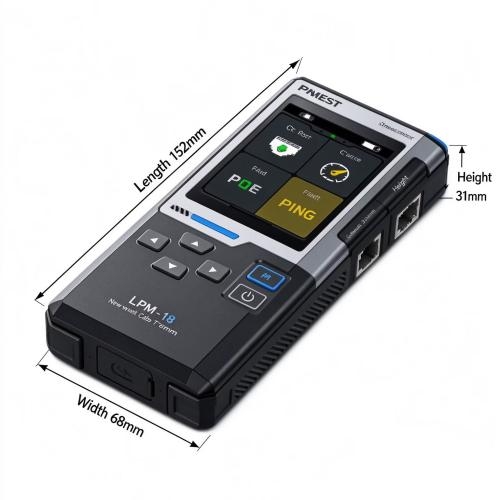
≈152×68×31mm |
Transmitter
| Function |
Description |
| Network Cable Pair Test |
RJ45 cable test interface, wire sequence & fault test, error prompt |
| Wire Tracing Test |
Standard tracing, Anti-interference tracing |
| Port Flashing |
Auto detect full-duplex / half-duplex, auto-negotiation / non-auto-negotiation |
| Network Speed Test |
10M/100M/1000M, Duplex mode (Full / Half duplex) |
| Cable Length Test |
≤20M(±1.6M), 20M~100M(±2.4M), ≥100M(±3.2M) |
| POE Test |
Auto identify standard / non-standard PoE, end-span / mid-span, 8-core power supply, power supply mode & power grade |
| Crimp Test |
RJ45 8-core crimping inspection |
| PING Test |
IP connection Ping test |
| IP Scan |
IP scanning function |
Receiver
| Function |
Receiver |
| Sensitivity Adjustment |
√ |
| Wire Tracing Mode: Standard / Anti-interference |
√ |
| Cable Pair Test |
√ |
| NCV Non-Contact Voltage Detection |
√ |
| Flashlight |
√ |
| Low Battery Indication |
√ |
| Headphone Jack Support |
√ |
Features
- 2.4-inch TFT High-Definition Color Display: View real-time network speed data, cable status and test reports on the bright color screen. Get clear readings and avoid misdiagnosis compared with simple LED-only cable testers.
- Network Cable Speed Test for Cat5 / Cat6 Cables: Measures Ethernet speed up to 10/100/1000 Mbps, supports full-duplex & half-duplex modes to verify actual network performance of Cat5, Cat5e and Cat6 twisted pair cables.
- Multi-Function Network Diagnostics: Combine cable length measurement, wire sequence & open/short fault test, anti-interference cable tracing, POE auto-detection and port flashing to solve most LAN cabling issues with one tool.
- Advanced Network Testing (Model Dependent): It network cable speed tester supports PING test and IP scanning to check network connectivity, assess latency and locate network faults.
- Handheld Field Ready Design: Built-in NCV non-contact voltage detection for safety check, LED work light, 1500mAh rechargeable battery with Type-C fast charging, over 10 hours continuous working time for long field service.
Dimension
Applications
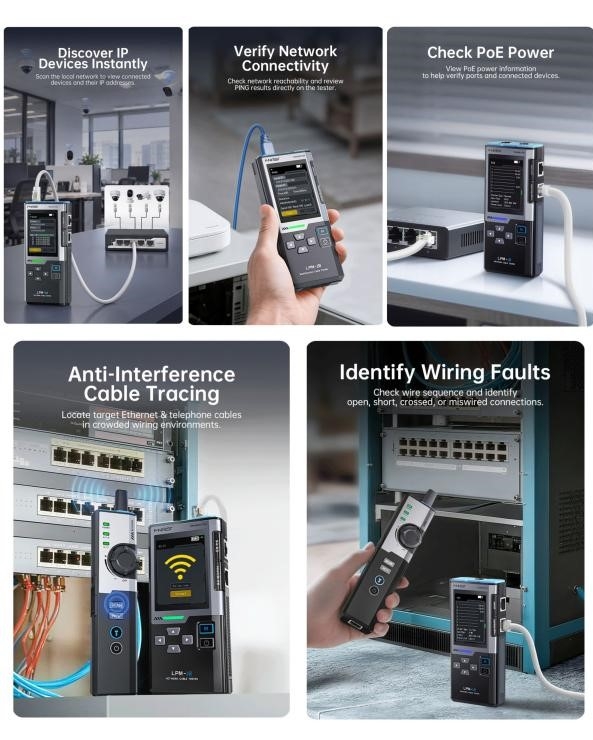
Explore real-world working scenarios of the network cable checking device all-in-one network cable tester. This multi-functional diagnostic tool empowers network technicians to finish network deployment, routine inspection and fault repair tasks in offices, server rooms and on-site wiring projects.
1. Office Network Audit: Quickly scan and locate all active IP devices on the local network. You can easily identify IP cameras, desktop PCs and wireless access points during office network inventory and audits.
2. Workstation Troubleshooting: Run ping tests and check network reachability directly on the tester. It helps diagnose unstable or disconnected network links for office desktop terminals and end workstations.
3. Surveillance System Installation: Detect PoE voltage and power parameters of network ports. It is widely used to confirm stable power supply for IP security cameras and WiFi access points powered by PoE switches.
4. Cable Cabinet Maintenance:Pinpoint target Ethernet and RJ11 telephone cables from dense bundled wiring. Ideal for sorting out tangled cables inside crowded server racks and wiring closets.
5. New Cabling & Outlet Repair:Check wire sequence and detect open, short or crossed cable connections. Perfect for inspecting new network cabling or troubleshooting hidden faults on wall-mounted network jacks and patch panels.
Q&A
Q1: How do I trace network cables with this wire tracker?
A: Connect the transmitter to your target RJ45 network cable port. Switch the unit to wire-tracing mode. Use the receiver to scan cables at the other end. If the received signal is weak, turn up the sensitivity knob; if the signal is too strong, reduce sensitivity to pinpoint the correct Ethernet cable accurately.
Q2: How can I trace telephone lines using this cable tracer?
A: Plug the transmitter into the RJ11 telephone line port. Activate the wire tracing mode. Hold the receiver to scan the bundled telephone cables. Adjust the rotary sensitivity dial: increase sensitivity for weak signals, lower sensitivity when signals get strong to isolate your target phone line from cable bundles.
Q3: Can I trace cables that run inside walls or cable conduits?
A: Yes. This wire tracer detects signals through cable jackets. For hidden cables, use moderate sensitivity and slowly scan along the cable path to find the matching wire.
Q4: Why should I adjust sensitivity during cable tracing?
A: Sensitivity adjustment helps filter cross-interference from adjacent wires. Higher sensitivity picks up faint signals for long or hidden cables. Lower sensitivity narrows detection range, helping you single out the exact target cable in dense cable bundles.
Q5: How does the PING & IP scan function help network troubleshooting?
A: PING test checks device connectivity and network response latency. IP scanning discovers active devices in the local network, providing data support to pinpoint network layer failures.