The portable laser particle counter is a lightweight, portable testing tool built for mobile cleanroom particle sampling. Featuring a semiconductor laser sensor, it detects airborne particles in six size ranges.
Its compact handheld design lets technicians carry it easily between sampling points. You can store data onboard, export via USB, transfer remotely through WiFi, or pair with an optional Bluetooth printer to print test results immediately on site. Powered by a long-life 10000mAh lithium-ion battery delivering 8+ hours runtime, this portable counter is perfect for routine audits, on-site validation and field cleanroom checks.
Specification
| Modle |
T-PC-LD-CL1 |
| Light Source |
Type: Semiconductor Laser
Service Life: >35,000 hours |
| Sampling Flow Rate |
Standard flow: 2.83 L/min (0.1 cfm)
Accuracy: ±5% @ 2.83 L/min |
| Particle Counting |
Particle size channels: 0.3μm, 0.5μm, 1.0μm, 2.5μm, 5.0μm, 10μm
Max counting capacity: 35,000 particles/L (for ≥0.5μm particles) |
| Display |
Screen: 3.5-inch smart touch LCD screen
Display content: Real-time concentration histogram, equivalent concentration value, real-time airflow, actual cleanliness class
Additional info: Time, date, measured value, temperature & humidity, room number, sampling point, sampling times, battery level, device status |
| Alarm Setting |
Cleanliness class alarm available |
| Data Processing |
Storage: Auto-save sampling data, 4GB internal available storage
Export: Data export via USB flash drive, print sampling data with Bluetooth printer
Calculation: 95% UCL calculation; displays particle concentration in particles/L, particles/m³, particles/ft³ |
| Battery |
Type: Lithium-ion battery, 3.7V, 10000mAh
Working duration: ≥8 hours |
| Operation & Connectivity |
Interfaces: Dual high-speed USB ports for USB flash drive and PC connection
Network: Built-in WiFi & Bluetooth for remote data transmission
Printer: Separate Bluetooth thermal printer for real-time data printing |
| Operating Environment |
Temperature: 0°C ~ 40°C
Humidity: 10% ~ 75% RH
Sampling gas: No corrosive gas such as acid or alkali |
| Storage Environment |
Temperature: 0°C ~ 45°C
Humidity: 0% ~ 90% RH |
Features
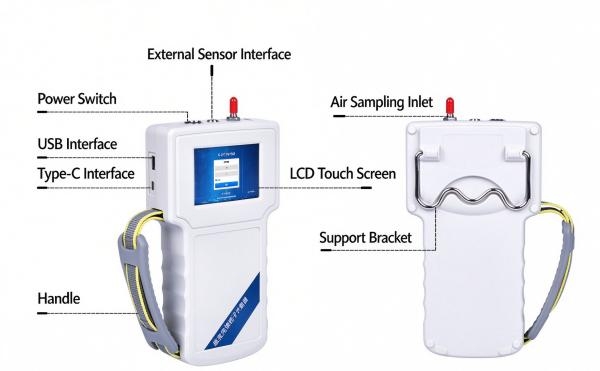
- Lightweight Handheld Portable Design: This handheld laser particle counter features an ergonomic grip for easy transport and mobile spot sampling across multiple cleanroom locations for airborne particle monitoring.
- 6 Particle Size Detection Channels: Measures airborne particles at 0.3μm, 0.5μm, 1.0μm, 2.5μm, 5.0μm and 10μm, with a maximum counting capacity up to 35,000 particles/L for cleanroom air testing.
- Audit Trail & Auto Cleanroom Grading: Supports automatic cleanliness classification and built-in 95% UCL calculation to satisfy cleanroom audit and quality compliance requirements.
- Flexible Data Output with Optional Printing: Built-in WiFi & Bluetooth, plus USB data export. Connect to an optional Bluetooth printer to generate instant hard-copy test reports on site.
- 3.5-inch Touch LCD & Long Battery Life: 3.5-inch touch LCD shows real-time particle and environmental data. Powered by a 10000mAh lithium battery, delivering ≥8 hours of continuous field testing.
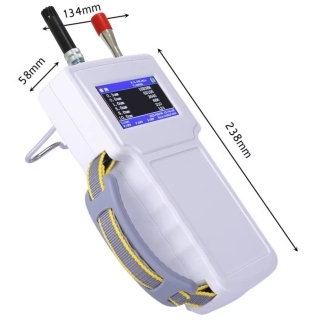
Dimension
Applications
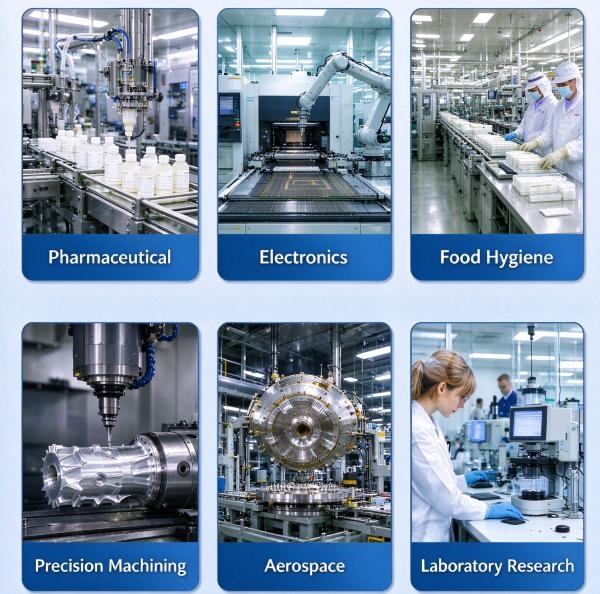
This handheld laser particle counter serves diverse industries requiring strict cleanroom monitoring, including pharmaceuticals, electronics, food hygiene, precision machining, aerospace, and scientific laboratories. It reliably detects airborne particles to help maintain controlled clean environments.
Q&A
Q1: How to use the portable laser counter?
A: 1. Fully charge the device before use and power it on. 2. Let the instrument warm up for several minutes, then place the sampling inlet in your target cleanroom area. 3. Set sampling parameters including sampling time and location ID on the touch screen. 4. Start sampling; the unit will count particles and calculate cleanliness class automatically. 5. Save data locally, export via USB, or send to the optional Bluetooth printer for printed reports.
Q2: How to change the printing paper of the handheld laser particle counter’s Bluetooth printer?
A: 1. Power off the Bluetooth printer and open the top cover. 2. Remove the empty paper roll core. 3. Load a new thermal paper roll, pull out a small section of paper and align it flat. 4. Close the printer cover, tear off excess paper, then power on the printer and reconnect Bluetooth with the particle counter. Only use thermal paper for this printer.
Q3: How to read the dust particle counter results?
A: The touch screen displays real-time particle concentration for each size channel (0.3μm ~10μm). It also shows calculated cleanliness grade, temperature, humidity, sampling time and 95% UCL value. You can view particle histogram directly on screen, or export/print full data with complete sampling records for audit documentation.
Q4: What factors interfere with particle counter readings?
A: Strong local airflow, human movement near the sampling port, dust buildup on the inlet, corrosive gas, and unstable temperature/humidity will affect measurement accuracy. Let the device warm up and keep the sampling inlet away from turbulent air during testing.